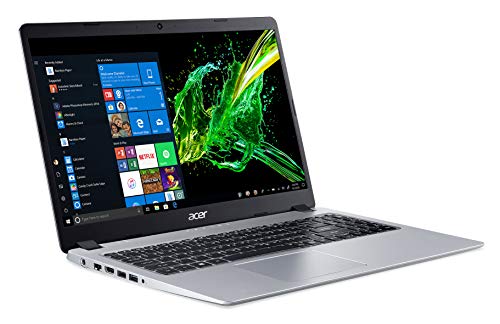







Whether you’re trying to do some creative work or screen recording on the road, you have to have one of the best video editing laptops available. Video editing is a tough task and becomes even more challenging if you don’t have a laptop to keep up with your demands. A laptop for a video editor should have a good display, a long-lasting battery life to keep up with on the go projects, ample storage space to keep all your projects streamlined and a powerful processor and GPU to help with faster rendering times.
Though budget laptops can do some basic, if low-quality, editing, anyone wanting something a little more professional will need a machine that’s much more powerful to not only handle big projects but to last a while without the need for upgrading to a newer laptop a year down the road.
When it comes to a Laptop for video editing, it will need a robust graphics card as well as fast memory. It also needs to be compatible with the apps you use for your workflow, such as DVD burning software, video converter software, and, of course, video editors.
To help you weed through all the different laptops out there, we’ve compiled our top picks to help you find something, including options for varying budgets. If you’re a pro, you’ll want to go for the higher-end ones to run programs with big hardware requirements such as non-linear video editors like Adobe Premiere or DaVinci Resolve. Whatever you fancy, these video editing notebooks are capable machines in general and many also make our best laptop and best mobile workstation lists.
To help your search, we’ve put together our suggestions for the 5 Best Video Editing Laptops in 2021.

Predator from Acer makes gaming laptops with one key thought in mind: if you’re getting a gaming laptop it’s because you want the flexibility and portability of a laptop. Where some gaming laptops are portable in a looser, “only compared to a desktop” sense, the Predator Triton is both slim and lightweight. In total, the Acer Predator weighs just under 4.5 pounds. For comparison, some other 15.6” gaming laptops push past twice that weight. Closed, it’s only 0.78 (20mm) thick. Minimal bezel around the 15.6” screen makes the case only 14.29 inches (363mm) by 10 inches (254 mm).
Moving along, the screen is a Full HD 1920×1080, 240Hz IPS panel. In a 15.6 inch screen, you’re typically not going to notice any improvement in quality above FHD. However, the high 240hz refresh rate is not a common spec in this price range and is going to deliver buttery-smooth visuals, especially in fast-paced fps games.
| Standing screen display size | 15.6 Inches |
| Max Screen Resolution | 1920×1080 Pixels |
| Processor | 5 GHz apple_ci7 |
| RAM | 16 GB DDR4 |
| Memory Speed | 5 |
| Hard Drive | 1 TB Flash Memory Solid State |
| Graphics Coprocessor | NVIDIA GeForce RTX 2070 |
| Chipset Brand | NVIDIA |
| Card Description | RTX 2070 Max-Q |
| Graphics Card Ram Size | 8 GB |
| Wireless Type | Bluetooth, 802.11ax |
| Number of USB 3.0 Ports | 3 |
| Average Battery Life (in hours) | 6 Hours |
The base battery life is 6 hours, which is almost decent, but putting any stress on the components is going to drop drastically.It’s only available in black, and apart from the angled corners doesn’t have any notable design features. The combination of metal and plastic build isn’t quite seamless either.

This is a high-performance portable laptop packed with Nvidia GeForce RTX 3050 Ti GPU (4GB GDDR6 VRAM) and a powerful AMD CPU, making it undoubtedly able to handle video editing and gaming with speed and ease. The Acer Swift X laptop also has you covered with its long battery life, 14 inches Full HD (1920 x 1080 IPS non-touch) screen, 16GB memory, amongst a plethora of other juicy specs you cannot ignore.
If you’re in doubt about how much of a good deal buying this laptop will be, you’ll be shocked to know that the Acer Swift X laptop guarantees a 100% RGB display with brightness levels of 300 nits and a 16:9 aspect ratio. There’s more. Your laptop’s security is two times secure with the fingerprint reader feature and Windows Hello sign-in options.
| Standing screen display size | 14 Inches |
| Screen Resolution | 1920 x 1080 |
| Max Screen Resolution | 1920 x 1080 Pixels |
| Processor | 1.9 GHz amd_ryzen_7 |
| RAM | 16 GB LPDDR4 |
| Hard Drive | 512 GB SSD |
| Graphics Coprocessor | NVIDIA GeForce RTX 3050Ti |
| Chipset Brand | NVIDIA |
| Card Description | Dedicated |
| Graphics Card Ram Size | 4 GB |
| Wireless Type | 802.11ax |
| Number of USB 3.0 Ports | 3 |
| Average Battery Life (in hours) | 12 Hours |
Like every other laptop, the Acer Swift X is not free of flaws, but some of the themes can be made up for in other areas depending on your specific video editing needs. The fans can get noisy at high performance, and the keyboards can get warm. The speakers are not impressive, and the 720p webcam can do with a bit of upgrading as the quality is relatively low. In the keyboard section, this laptop has minor keys and a rather tricky page with up and down arrows which are unusually very close to each other. Though the spacing is good enough, another obvious flaw is the location of the power button at the top right corner directly above the delete key.
Is the laptop the perfect laptop for video editing? It all depends on your needs. Using Alexa on your PC is as easy as asking a question. Just ask and Alexa can check your calendar, create lists, play music, answer questions, read the news and more. However, considering its flaws, if the upsides meet your requirements.

The ASUS ROG Zephyrus G14 tries to strike that balance. The 14″ display still features an FHD IPS panel, which will give you a sharp and vibrant color display. The refresh rate is dropped to 120Hz, not a difference the naked eye will typically notice from 144Hz, in an effort to improve battery life.
Portability is virtually the only reason to drop to 14″ on a gaming laptop, and fortunately, the Zephyrus G14 delivers on that front. It’s very slim at 0.7 inches, and only 12.8 inches by 8.7 inches, meaning it can be easily stowed in most bags, including some bike bags. It only weighs 3.5 pounds which is the lightest you’re going to get without dropping to a netbook. ASUS has made excellent use of the “step back a generation” tactic to deliver an excellent price to performance ratio on the CPU.
| Standing screen display size | 14 Inches |
| Max Screen Resolution | 1920 x 1080 Lines Per Inch |
| Processor | 2.3 GHz amd_r_series |
| RAM | 16 GB |
| Memory Speed | 3200 MHz |
| Hard Drive | 1 TB SSD |
| Graphics Coprocessor | NVIDIA GeForce RTX 2060 |
| Chipset Brand | NVIDIA |
| Card Description | Dedicated |
| Graphics Card Ram Size | 16.00 |
| Standing screen display size | 14 Inches |
| Max Screen Resolution | 1920 x 1080 Lines Per Inch |
| Processor | 2.3 GHz amd_r_series |
| RAM | 16 GB |
| Memory Speed | 3200 MHz |
Lastly, the battery life is advertised as up to 11 hours, though that will typically be lower, depending on your usage. You can safely expect 5-6 without needing to make any major adjustments to performance.In essence, it’s a collection of over a thousand programmable LEDs on the lid of the case, which can be arranged into logos or designs, or used to display soundwave bars when listening to music on the quad speakers.

With this HP Range, they are certainly not joking around when they came out with one of the best laptops for video editing under 1000 bucks. The specs drop many jaws with an insane 16Gb RAM working together with an AMD Octa-Core Ryzen 7 5700U processor unit integrated AMD Radeon graphics to form a reliable brain capable of breaking down the strongest walls, on paper at least. In reality, this editing laptop is a little less dramatic, but very effective nonetheless.
| Standing screen display size | 15.6 Inches |
| Screen Resolution | 1920 x 1080 |
| Max Screen Resolution | FHD (1920 x 1080) IPS Touchscreen Pixels |
| Processor | 1.8 GHz ryzen_7 |
| RAM | 16 GB |
| Memory Speed | 1.8 GHz |
| Hard Drive | 512 GB SSD |
| Graphics Coprocessor | Integrated AMD Radeon graphics |
| Chipset Brand | AMD |
| Card Description | Integrated |
| Wireless Type | Bluetooth |
| Average Battery Life (in hours) | 8.75 Hours |
The battery life of HP’s Pavilion Flagship is also deserving of a passing score, nothing more or less. It’s Hard drive is a whole terabyte, but clocks low transfer speeds, but is future-proof with enough type C USB ports in a full deck that includes an earphone Jack and a HDMI port, not bad for a cheap laptop for video editing.

The due process would be to first take off hats to the most beautiful and slimmest laptop Dell have ever made. The visual appeal of this tech piece is its first selling point. On a more functional note, the 8th gen Intel Core i7 and 16Gb of RAM built-in promise and deliver an unmatchable experience for laptops under the $1000 benchmark, recording 4k to 1080p transcoding speeds and overall performance that many premium laptops can only dream of. This is mismatched by the less inspiring graphic ability of the Inspiron 7000 that is accompanied by a rather meek quality of audio output.
Fortunately, the product is saved by an illuminating display that creates a thirst for more 4k panels, and an innovative combination called the ‘Active Pen’. The Active Pen is the banner for the 2-in-1 options for the laptop’s usability
| Standing screen display size | 15.6 Inches |
| Max Screen Resolution | 1920 x 1080 |
| Processor | 4.5 GHz core_i7_family |
| RAM | 8 GB DDR4 |
| Memory Speed | 2666 MHz |
| Hard Drive | 256 GB 256GB M.2 PCIe NVMe Solid State Drive |
| Graphics Coprocessor | NVIDIA GeForce GTX 1050 |
| Chipset Brand | Intel |
| Card Description | Dedicated |
| Graphics Card Ram Size | 3 GB |
| Wireless Type | 5 GHz Radio Frequency |
| Number of USB 3.0 Ports | 3 |
A pen that equally registers notable responsiveness on touch with the screen, is brilliantly placed in a crevice fashioned off the hinges of the system. This addition accounts for the spike in the ergonomic satisfaction scores of the Dell Inspiron 7000, but does nothing to rescue the battery life of the laptop from the load of the 4k display.
We’ve selected a host of our top-rated models for video editing below. Some are earmarked for content creators; some are mobile workstations; and a few are actually thin-and-light models. Any of them should be powerful enough for at least casual editing, and some are muscled-up enough for major editing tasks.
Ultimately, how much you’ll have to budget depends on whether you’re using your video-editing laptop only for quick work in the field, or whether you plan to bring it back to the studio, plug it in, and use it as your primary machine. If you’re going the former route, you’ll also want to take a look at our best desktops when it comes time to upgrade your main rig. If you’re choosing the latter, you might want to familiarize yourself with our list of best video editing, one of which may offer the power especially the heftier CPU you need for marathon editing sessions on deadline night. Color-precise screens tend not to be their forte, but good gaming laptops tend to have many of the same traits you need in a good video editing laptop.
For Video Editing and graphics designing, Desktop beats the laptop easily because desktop can give you more performance for the price than a laptop. But if you are adding portability in the want list, then you have to go with a laptop.
You can access it by clicking your profile and selecting YouTube Studio from the side panel. The editor allows you to do simple tasks such as trimming, splitting, and blurring elements in the background (car plate numbers, people, etc.). The editor doesn’t have any advanced features.
32GB is the optimal capacity of RAM a computer needs for video editing. 32GB will allow you to edit all kinds of files, and you will be able to work with longer videos. With 32GB RAM, you could have multiple programs running at the same time, and still be able to efficiently edit and preview your videos.
Yes, Windows 10 comes with a basic video editor that allows you to trim video clips, add text and music, overlay effects, and incorporate 3D objects. Type “video editor” into your Windows search bar to open the program.
You don’t need a degree to become a video editor. Some companies specifically advertise for graduates in related subjects, and it certainly won’t do any harm to have a degree in something like film and television studies, media production or film and media.